


Reach for a Coke
This animation is a Proof of Concept for a mock campaign for Coca Cola's collaboration with KitBash3D, and everything revolves around the tagline - Reach for the stars, Reach for a Coke.

Coca Cola = Christmas

While cleaning up all the UVS, I noticed that the original label was a bit stretched, so I had to extend the edges in Photoshop because of the way Houdini handles image textures. It's very important for brands not to have their logos and images distorted, so I'm happy I caught this.


Storyboards & Styleframe Development

LookDEV rendered with Karma
After analyzing the tagline and thinking about my concept, the only thing I could think of was Christmas. Coca Cola is notorious for their holiday campaigns so I decided to look into their holiday campaigns and reference them directly to my approach.


Having Karma as the required render engine for this project forced the use of Houdini, so before jumping into any animation, I had to first process a Coke bottle model and turn it into a usable asset by using the USD workflow within Houdini.
The original model was made in Cinema4D's physical renderer, so I had to optimize it and retexture it in Karma to make it look photorealistic.
There was a lot of flatness in the original texture, so a big selling point was adding scratches, condensation, and subsurface scattering inside of the liquid that matches the real life physical values.


Original (C4D Physical)
Mine (Karma XPU)


Asset Problem Solving
After importing the FBX into Houdini, the UVs were messed up, and there is a very powerful tool in Houdini that calculates new UVs pretty well.
There was still one crucial problem, the seams were visible and compressed the UVs very bad, but the tool also accounts for this; By checking one box, it magically blends it so that all boxes connect from edge to edge and maintain size


Houdini quirks, issues, solutions, and other great things
I wanted to have Coca Cola bottles as ornaments on my Christmas Tree, so I took advantage of Houdini's geometry-to-point aspect and took vertices of the original ornaments, and used those points to scatter Coca Cola bottles in the place of those points.

Since the original model didn't come with any textures, I also had to figure out how the LED lights will work. I tried using an emission map, but it made them look weird and not emit properly. I needed real lights.

I used the same scatter system as the bottles, but linking a light to each of the LED strips would create an insane amount of lights that would kill render times, and I didn't need that many, I just needed some to light the room and sell the effect.


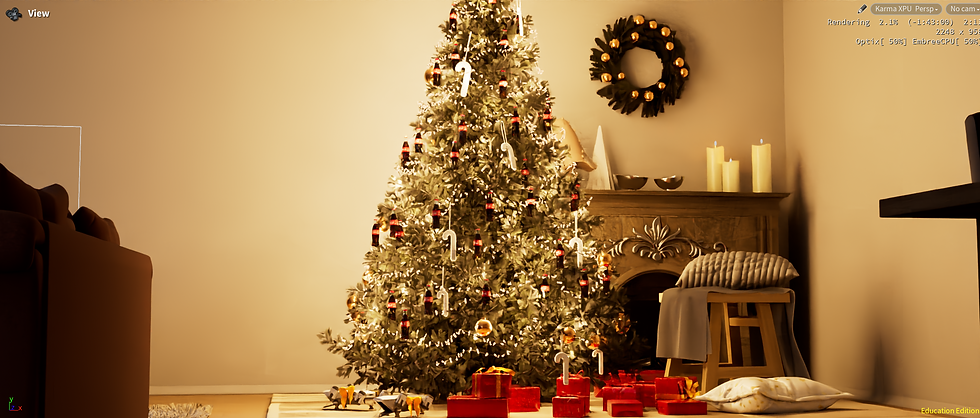
Original amount of lights
Numbed down amount of lights
Camera Crane
A cool thing about this project is that my camera was animated using a camera crane - which is not a part of vanilla Houdini. It is an extension made by an artist in the Houdini community and it immensely helped me to get the smooth camera movements.


Post FX and Compositing
A big part of cementing the magical look of Coca Cola was adding the little sparkles and blooms that make glows - glow more. The main process of processing the look was done in Nuke. Using Houdini, I exported cryptomattes and a light pass, and used that information to create depth blur and glow on specific objects.


